The Dell/VMware VEP1445 and in general the VEP1400-series are a nice set of low power machines driven by a Denverton CPU. They usually come in two flavors, either the Edge 600 series or VEP1400 series. Besides the outside look (white case or black case), they are fairly similar.
They all come with 2 SFP+ ports (limited to SFP on the low power VEP1405 / Edge 610) and 6 1G Ethernet ports, all supporting VirtIO, making them nice edge boxes for virtualization, although only low power applications are recommended due to the type of CPU.
| Model | Edge 610 / VEP1400 | Edge 620 / VEP1425 | Edge 640 / VEP1445 | Edge 680 / VEP1485 |
| CPU | C3558 | C3758 | C3958 | |
| Cores | 2 | 4 | 8 | 16 |
| Memory | 8GB (soldered) | 8GB (soldered) | 16GB (soldered) | 32GB (16GB soldered, 16GB so-dimm) |
| Network | 2x SFP 1Gb / 6x 1Gb | 2x SFP+ 10Gb / 6x 1Gb | 2x SFP+ 10Gb / 6x 1Gb | 2x SFP+ 10Gb / 6x 1Gb |
The memory can be upgraded through a SO-Dimm slot, supporting up to 32GB sticks (must be DDR4 ECC UDIMM 2400MT). The CPU should support Flex memory, which means the fraction of the memory stick that equals the soldered memory should work as dual-channel, while the leftovers will work in single channel (to be tested).
These boxes also support an m.2 sata port for the hard disk, and a mini-pcie slot for a wifi/bluetooth card, standard in some configurations. The mini pcie slot can support an nvme drive, but this causes some complains about the missing wifi card with some bios revisions, requiring some nvram tinkering to silence it. The nvme drive would be limited to one lane of pcie, so no need to install a beefy disk there.
These devices also have an eMMC device that can be used to either install the base system (not recommended) or to install Dell's tools suite called DiagOS (a flavor of debian that contains some utilities).
Installation of DiagOS
The requirements are simple, one need a mini-usb cable and a usb stick. As these devices do not have a display output, it must be accessed via a serial console (hidden port) that uses a Silicon Labs CP2102 UART controller. Most of the recent kernels have the cp210x driver available, otherwise it must be downloaded / built from the Silicon Labs website.
The USB port is located by the SFP cages under a small panel held in place by a #0 Phillips screw.
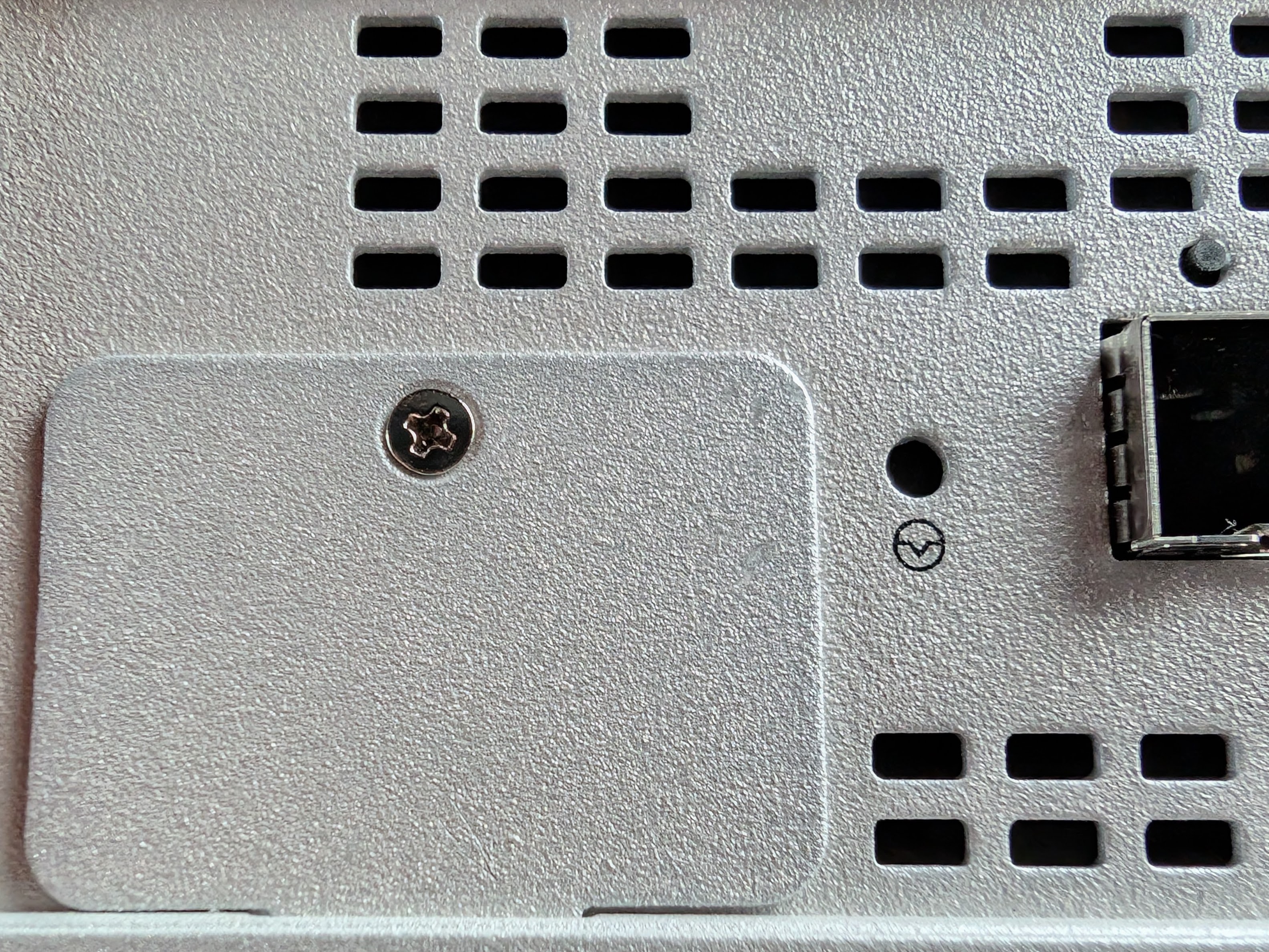
Once the screw was removed, the port is revealed. An interesting fact is that the port does not require the VEP1445 to be powered to be recognized, which allows early access to the boot screen.
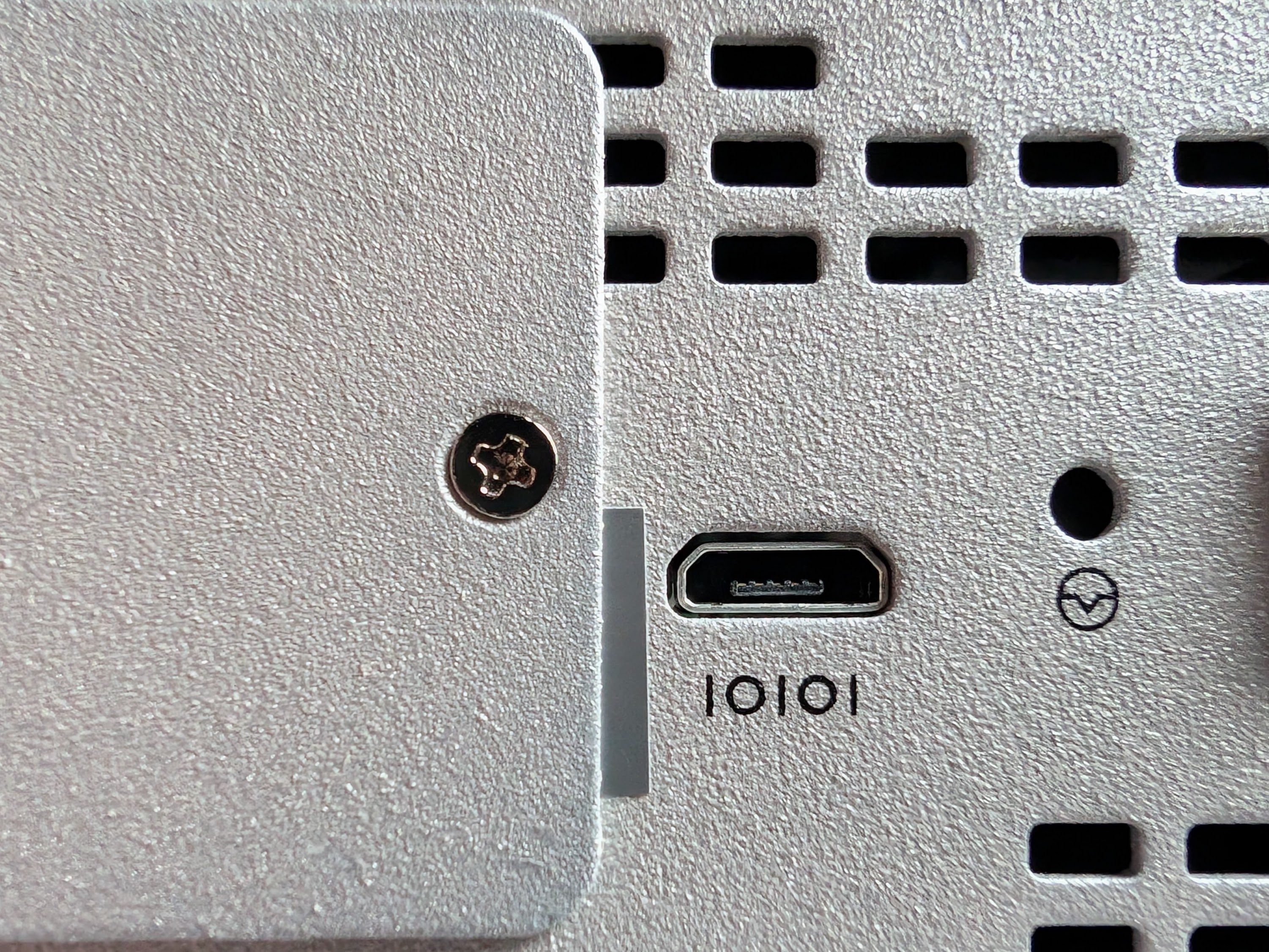
The console can be accessed via any terminal, using 115200 baud, 8 bit with no parity.
The following download urls will be used: the ISO is used for USB or eMMC installation, while the deb file allows installation on a debian-based system.
- DiagOS deb download URL: https://dl.dell.com/FOLDER11320873M/1/dn-diags-VEP1400-Diag%20Tools-3.43.4.81-26-2022-12-08.zip
- DisgOS ISO URL: https://dl.dell.com/FOLDER11320770M/1/diagos-recovery-x86_64-dellemc_vep1400_c3538-r0.3.43.3.81-27.zip
Before installing, CSM should be disabled in the bios, or at least set to UEFI boot only.
With the install USB stick plugged in one of the USB slots, let the installer run:
  Booting `VEP1400 DiagOS Install'


Platform  : x86_64-dellemc_vep1400_c3538-r0

Version   : 3.43.3.81-26

Build Date: 2022-03-01T23:48-08:00

Info: Mounting kernel filesystems... done.
starting to install vep1400 DiagOS
discover: Rescue mode detected. No discover stopped.
[   13.904747] sd 6:0:0:0: [sda] No Caching mode page found
[   13.910211] sd 6:0:0:0: [sda] Assuming drive cache: write through
ONIE: Executing installer: /diag-installer-x86_64-dellemc_vep1400_c3538-r0-3.43.3.81-26-2022-03-01.bin
Ignoring Verifying image checksum ... OK.
cur_dir / archive_path /var/tmp/installer tmp_dir /tmp/tmp.kzNltf
Preparing image archive ...sed -e '1,/^exit_marker$/d' /var/tmp/installer | tar xf - OK.
Diag-OS Installer: platform: x86_64-dellemc_vep1400_c3538-r0
platform found vep1400
platform vep1400 is supported.
console port ttyS0

****************************
Select Installation Device
****************************
1.SSD
2.USB Disk
3.eMMC
0.Quit
---------------------------
Please select the device type that DIAG OS will be install on :
Chose your preferred installation target (it is recommended to use the integrated eMMC storage), for example 3.
Install Diag OS on eMMC
Checking device /dev/mmcblk0 size...
ok
ls: /boot/efi/EFI/*: No such file or directory
 Found EDA-DIAG partition on device /dev/mmcblk0p2
 File /tmp/diag_os_install_mode exists, forcing install mode
Diag OS Installer Mode : INSTALL


Installing diag-os on mmc device
Checking mmc device presence...
ok
Initializing mmc device
Clearing GPT and MBR data structures
GPT data structures destroyed! You may now partition the disk using fdisk or
other utilities.
Clearing GPT and MBR data structures...ok

creating GPT disk label
Creating new GPT entries.
The operation has completed successfully.
creating GPT disk label...ok

Creating ESP on partition 1. size 128MB with label EFI System
Creating ESP on partition...ok

Creating file-system(vfat) on esp device /dev/mmcblk0p1 with label EFI System
mkfs.fat: warning - lowercase labels might not work properly with DOS or Windows
mkfs.fat 3.0.26 (2014-03-07)
Creating file-system(vfat) on esp...ok

Creating diags partition 2 size 2048MB with label EDA-DIAG
Creating diags partition...ok
Creating file-system on diags partition
mke2fs 1.42.13 (17-May-2015)
Discarding device blocks: done
Creating filesystem with 524288 4k blocks and 131072 inodes
Filesystem UUID: *******-****-****-****-********
Superblock backups stored on blocks:
	32768, 98304, 163840, 229376, 294912

Allocating group tables: done
Writing inode tables: done
Creating journal (16384 blocks): done
Writing superblocks and filesystem accounting information: done

Creating file-system on diags partition...ok

Mounted /dev/mmcblk0p2 on /tmp/tmp.5JeOKY

Preparing /dev/mmcblk0p2 EDA-DIAG for rootfs install
untaring into /tmp/tmp.5JeOKY

rootfs copy done
Success: Support tarball created: /tmp/tmp.5JeOKY/onie-support-dellemc_vep1400_c3538.tar.bz2
Updating diag-os ver in system-eeprom
Diagos ver 3.43.3.81-26
Deleting TLV 0x2e: Diag Version
Adding   TLV 0x2e: Diag Version
Programming passed.
TlvInfo Header:
   Id String:    TlvInfo
   Version:      1
   Total Length: 182
TLV Name             Code Len Value
-------------------- ---- --- -----
Product Name         0x21  12 VEP1445-V220
Part Number          0x22   6 0FXKVC
Serial Number        0x23  20 *****************
Base MAC Address     0x24   6 **:**:**:**:**:**
Manufacture Date     0x25  19 11/24/2020 15:26:02
Device Version       0x26   1 1
Label Revision       0x27   3 A02
Platform Name        0x28  22 x86_64-dellemc_vep1445
MAC Addresses        0x2A   2 64
Manufacturer         0x2B   5 DNG00
Country Code         0x2C   2 TW
Vendor Name          0x2D   8 Dell EMC
Service Tag          0x2F   7 6CT6V43
Vendor Extension     0xFD  21  0x00 0x00 0x02 0xA2 0x20 0x14 0x9B 0x0B 0x83 0x51 0x8E 0x4A 0x6A 0x88 0x2D 0x0C 0x8B 0x3B 0xC1 0x37 0x54
Diag Version         0x2E  12 3.43.3.81-26
CRC-32               0xFE   4 0x5DBF9BE2
Checksum is valid.
[VEP1400-X] Board ID : 0x0a
rootfs install ok

Mounted /dev/mmcblk0p1 on /tmp/tmp.BMbs0e

Installing grub for diag-os
done
Updating EFI NVRAM Boot variables...
done

Updating Grub Cfg /dev/mmcblk0p2
clean up..done

INSTALLER DONE...
Please uninstall your USB disk out of box, wait 2 sec
Removing /tmp/tmp.kzNltf
ONIE: NOS install successful: /diag-installer-x86_64-dellemc_vep1400_c3538-r0-3.43.3.81-26-2022-03-01.bin
ONIE: Rebooting...
This should be not reachable unless something wrong is there!!!!!
Info: BIOS mode: UEFI
Info: Using eth0 MAC address: **:**:**:**:**:**
Info: eth0:  Checking link... down.
ONIE: eth0: link down.  Skipping configuration.
ONIE: Failed to configure eth0 interface
Starting: klogd... done.
discover: Rescue mode detected. No discover stopped.
Stopping: dropbear ssh daemon... done.
Stopping: telnetd... done.
Stopping: klogd... done.
Stopping: syslogd... done.
Info: Unmounting kernel filesystems
umount: can't unmount /: Invalid argument

The system is going down NOW!

Sent SIGTERM to all processes

Sent SIGKILL to all processes

Requesting system reboot
[  276.199325] reboot: Restarting system
Once restarted, let the device boot automatically to DiagOS. The default credentials are root / calvin .
Keeping the DiagOS partition allows troubleshooting any kind of issues as long as there is no corruption of both bioses.
- Log in to post comments