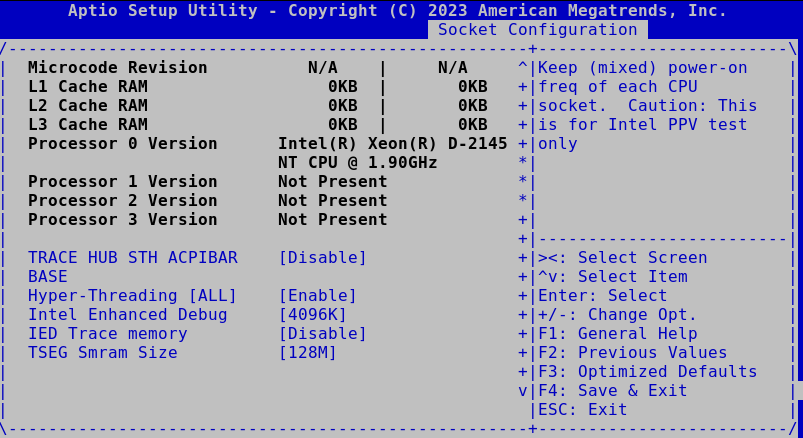
VEP4600 BIOS settings

By admin

While tinkering with a VEP4600, I ended up loading BIOS defaults at multiple occasions, which caused some performance issues or feature regressions.

No Hyper-threading

Settings can be accessed through Socket Configuration > Processor Configuration > Hyper-Threading [ALL]

Hyper-Threading

Update firmware on VEP4600

By admin

The SD-WAN VEP4600 (or edge 3400) appliance still has received some updates from Dell, mostly for stability. Most of the second-hand purchases were never updated and could benefit from a refresh.

Unlike the VEP1405 series that house an eMMC, on which diagOS can be installed, most of the updates here should be done from an installed OS or a boot disk.

Interface (re-)assignment on VEP1445 with proxmox 9.0

By admin

With 6 Gigabit and 2 10G SFP interfaces available on the VEP1445 (and other VEP1400x or Edge 620-680 series), the default interface assignment of debian or proxmox is sometimes not the most convenient.

For reference the interfaces are assigned as follows on my latest Proxmox 9.0 installation

Install / update DiagOS on VEP 1400 series

By admin

The Dell/VMware VEP1445 and in general the VEP1400-series are a nice set of low power machines driven by a Denverton CPU. They usually come in two flavors, either the Edge 600 series or VEP1400 series. Besides the outside look (white case or black case), they are fairly similar.

They all come with 2 SFP+ ports (limited to SFP on the low power VEP1405 / Edge 610) and 6 1G Ethernet ports, all supporting VirtIO, making them nice edge boxes for virtualization, although only low power applications are recommended due to the type of CPU.